.jpg)
TIPS
From time to time, Capital City Computing will post "tips" on how to use the most common programs. These are offered FREE OF CHARGE for your benefit. If you want to train more thoroughly on any program, just visit our Training page and then Contact us to schedule full training.
 |
Windows 10 Logo Key Shortcuts |
| posted 3/19/20 |
One of the more powerful, and probably least used, set of keyboard shortcuts involves the Windows logo key, which is common on most keyboards
packaged with a Windows-based personal computer these days.
Table A offers a rundown of these productivity-boosting shortcuts:

|
Coronavirus Its Effects on Business |
| posted 3/5/20 | This content removed after the threat of legal action by PicRights International Inc.on behalf of The Associated Press. |
|
A Short Visit To Our Solar System A Video |
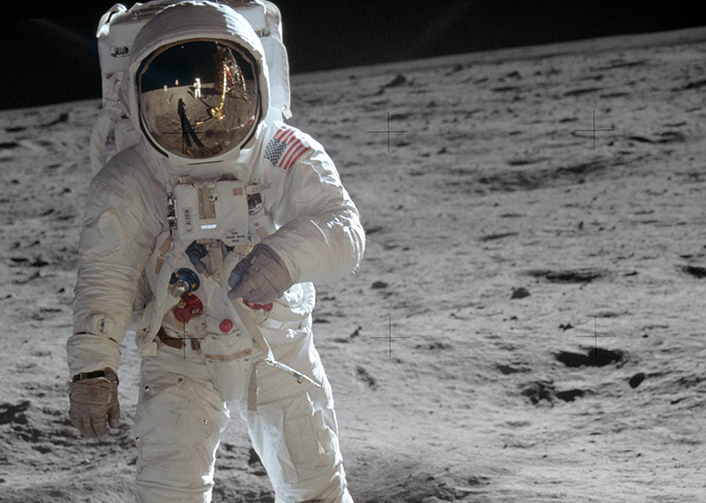
| posted 9/19/19 | In honor of the 50th Anniversary of the Apollo 11 moon landing, the Leisure Hour Club of Carson City invited me to make a presentation. Click on the Astronaut to view the video. Sound ON. |
 Hope you enjoyed the tour...
 |
Countdown to July 20th Article: 50 Years Later, The Moon is Still Great for Business |
| posted 3/5/20 | By: ALEXANDRA OLSON June 23, 2019 (photos courtesy AP) As a former NASA employee, I can't resist bringing these memories back to life. For more links to NASA info on the Anniversary, visit https://www.nasa.gov/specials/apollo50th/events.html |

NEW YORK (AP) — Fifty years after humans first visited, businesses are still trying to make a buck off the moon.
Hundreds of millions of people were riveted when Apollo 11 landed on the moon on July 20, 1969. Naturally, marketers jumped at the chance to sell products from cars and
televisions, to cereal and a once-obscure powdered drink called Tang.
They are at it again in 2019, as the 50th anniversary of the giant leap for mankind approaches.

There’s the cosmically priced $34,600 limited edition Omega Speedmaster, a tribute to the watch that Buzz Aldrin wore on the
moon(see picture above). And the more down-to-Earth Budweiser Discovery Reserve, which
revives a recipe from the 1960s and features 11 symbolic stars in the packaging.
There’s the playful NASA Apollo 11 lunar lander set from Lego.And Nabisco’s
indulgent purple Marshmallow Moon Oreo cookies. And who doesn’t need “one small step” t-shirts,
Saturn V crew socks or an Apollo 11 travel tumbler?
But seriously, some brands take genuine pride at having been part of the first moon landing.
Omega Speedmaster watches have been an icon of space travel since NASA chose them for its manned missions in 1965 after other
watches failed tests. In 1970, the crew of the ill-fated Apollo 13 mission used a Speedmaster to time a 14-second engine burn to align themselves for re-entry to Earth.
“It continues to be an important tool to have. You have to look only to the Apollo 13 mission,” said James Ragan, a retired NASA aerospace engineer who tested the watches
in the 1960s.
Omega’s gold Speedmaster is a version of the watches the company presented to astronauts at a gala dinner in 1969. A relatively more modest $9,650 stainless steel timepiece
features a laser-engraved image of Aldrin descending from the lunar lander.
Then, there are the anti-gravity Fisher Space Pens,veloped specially for the Apollo missions. For luxury space
enthusiasts, Fisher Space Pen Co. has a $700 limited edition pen with authenticated materials from the Apollo 11 space craft.
Back in 1969, both Omega and Fisher Space Pen Co. were quick to promote their Apollo 11 connections with media and advertising campaigns, as were NASA contractors like
Boeing and General Electric.
Stouffer’s made sure consumers knew it provided food for Apollo 11 astronauts once they were back on Earth, launching the
ad campaign “Everybody who’s been to the moon is eating Stouffer’s.” Fifty years later, the Nestle-owned brand is celebrating with a media campaign to share some of the
recipes from 1969.
But brands with no direct Apollo connections were not about to sit out an event that nearly every U.S. household with a television watched.
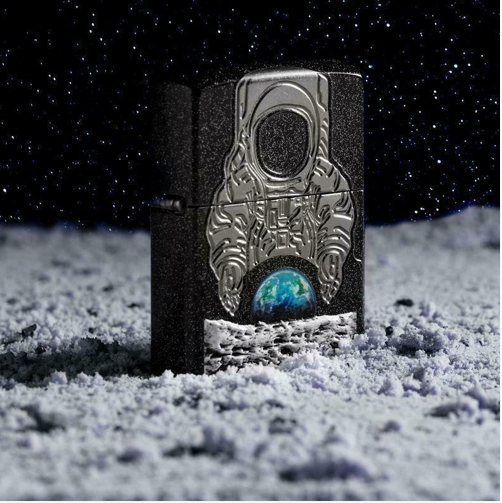
In 1969, Zippo released a lighter saluting the Apollo 11 mission and its astronauts (see picture below).
A half-century later, Zippo has sold out of the 14,000 limited edition lighters released in tribute to the anniversary, priced at $100 each.
Krispy Kreme, which says it served doughnuts to witnesses at the Apollo 11 launch, conjured up a new treat — filling its
classic glazed doughnuts with cream — in honor of the anniversary.
If many of the tributes have a vintage feel, it might be because public interest in space exploration has ebbed and flowed over the years, with no single event capturing
the global euphoria of the first moon landing, and the Apollo program ending in 1972.
“Since 1972, human space travel has been dead boring. We’ve gone around and around and around the Earth a whole bunch of times, and that is not interesting to people,”
said David Meerman Scott, a marketing strategist and co-author of the book “Marketing the Moon,” which chronicles the public relations efforts that went into the Apollo
11 mission.
Still, Scott said the 50th anniversary comes amid renewed interest, with NASA’s plans to send astronauts back to the moon by 2024 and to Mars in the 2030s.
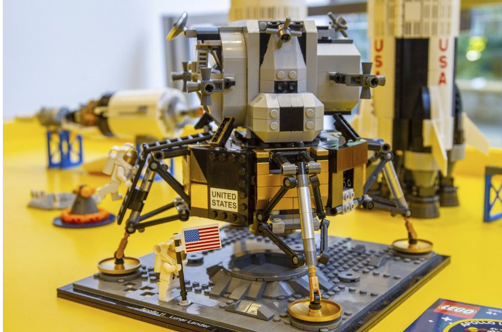
Indeed, Lego conceived its lunar lander as a grown-up display set, part of its
Creator Expert series aimed at adults (see picture above). For kids, born to parents who themselves who have never known a world without space
travel, the Danish toy company is releasing six new Lego City Mars exploration sets, designed in collaboration with NASA with futuristic rockets that would take humans
to the red planet.
“It’s about giving kids something aspirational, where they can see themselves, versus trying to project them into a historical moment,” said Michael McNally, senior
director of brand relations at Lego.

Budweiser, similarly, has declared its ambition to be the first beer on Mars, participating in barley-growing experiments on
the International Space Station. Still, the Anheuser-Busch brand saw marketing potential in evoking the patriotism that the Apollo 11 mission stirred in Americans
during politically polarized times (see picture above).
“Beer at its core is a very democratic drink. It brings people together,” said Ricardo Marques, vice president of marketing at Anheuser-Busch. “We like in particular to
remind people of everything that is good and everything we shouldn’t forget.”
After all, watching the first moon landing was a personal experience for hundreds of millions of people around the world.
That was thanks to TV — a connection Samsung has seized for its media campaign promoting its QLED 8K TV, tied to
CNN’s Apollo 11 documentary.
|
Microsoft Word© Multiple Documents |
| posted 5/7/19 | When you open more than one document, each document is in its own window, with all the controls
of any window. To change the size or shape or location of a document window, use any standard Windows techniques:
|
 |
 |
| These Windows controls are on the top right end of the Title bar | Drag the mouse pointer on any edge to resize |
START A NEW BLANK DOCUMENT
Select the New command from the File tab, and then double-click Blank Document.
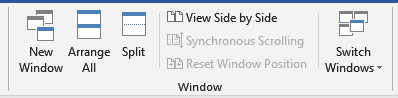
Click the document’s icon on the Windows Task Bar or use the View tab, Window section, Switch Windows pull-down. Select the document you want to see.
On the View tab, Window section, select Arrange All or View Side by Side.
Select Split on the View tab to view more than one part of a single document at a time. Drag the split line up or down to re-position it. The screen will split into panes with independent scrolling.
The View tab, Window section, New Window command. A new window containing a copy of the current document opens. You can move independently in each window.
TO RESTORE TO A SINGLE PANE
Select Remove Split on the Ribbon.
Drag the Split Pane bar up to the top of the scrollbar.
|
Database Management What Exactly is a Database? |
| posted 4/2/19 | We define it as a collection of useful information, organized in a systematic and specific way. |
SOME COMMON DATABASE EXAMPLES ARE:

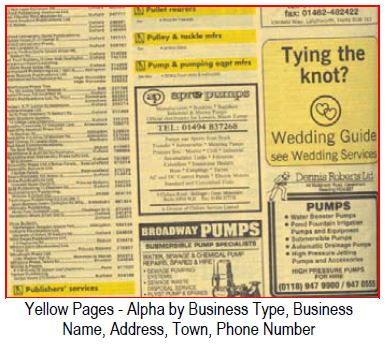
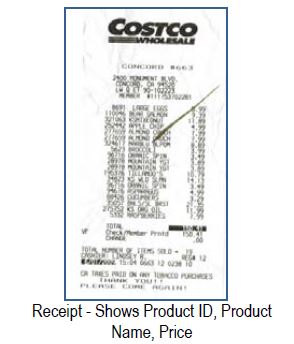
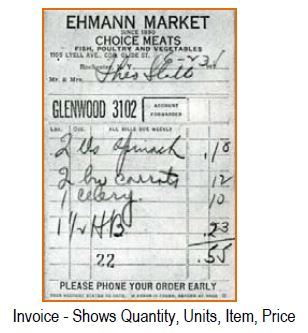
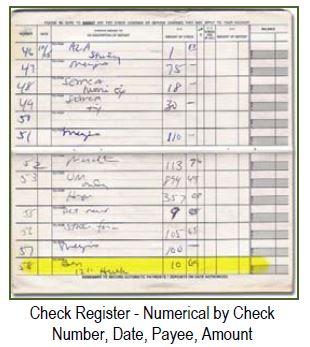

In business and at home, we generally use a computer program to help us manage, manipulate, and arrange our information (data). We call these
Database Management Systems (or Programs). Some of the more common ones you will see in your local stores are: Microsoft Access©, FileMaker Pro©, SQL (Structured Query
Language) programs such as MySQL© or Microsoft SQL Server©, DB2©, Informix©, Paradox©, Sybase©, FoxPro©, and Oracle©.
"A Database Management System (DBMS) is software for creating and managing databases. The DBMS provides users and programmers with a systematic way to create,
retrieve, update and manage data.
A DBMS makes it possible for end users to create, read, update and delete data in a database. The DBMS essentially serves as an interface between the database and end
users or application programs, ensuring that data is consistently organized and remains easily accessible."
©TechTarget
DATABASE ELEMENTS:
Tables = Data. Within a database are one or more tables which contain lists of related information
Queries = Manipulation of data
Forms = Displays for input and edit
Reports = Printed output
Macros and Modules = Programming additional capabilities
|
Microsoft Excel© Keyboard Movements in Spreadsheets |
| posted 3/22/19 | You may not always find the mouse the most convenient way to move in Excel. If your hands
are on the keyboard, you may wamt some keyboard shortcuts to help moving in Excel. You already know the mouse movements:
|
When you open more than one document, each document is in its own window, with all the controls of any window. To change the size or shape or location of a document window, use any standard Windows techniques:
- Use the Windows controls
- Drag any edge of the window
- Drag the Title bar
- Double-click the Title bar
Scroll bars
Arrow keys = moves one cell up or down or column right or left
Enter key = moves one row down
Tab and Shift-Tab keys = moves one column right or left
Home key = moves left edge of current sheet
Ctrl-Home key combination = moves to cell A1 of the current sheet
PgUp and PgDown keys = moves one screen up or down (about 23 rows)
Alt-PgUp and Alt-PgDown key combinations = moves one screen left or right (about 12 columns)
Ctrl-PgUp and Ctrl-PgDown key combinations = moves to next or previous worksheet
Tab and Shift-Tab keys = moves one column right or left
Home key = moves left edge of current sheet
Ctrl-Home key combination = moves to cell A1 of the current sheet
PgUp and PgDown keys = moves one screen up or down (about 23 rows)
Alt-PgUp and Alt-PgDown key combinations = moves one screen left or right (about 12 columns)
Ctrl-PgUp and Ctrl-PgDown key combinations = moves to next or previous worksheet
Ctrl-N = Opens a New Blank Document
Ctrl-O = Displays the Open Screen
Ctrl-S = Save the current document with the current name
Ctrl-P = Displays the Print Screen
Ctrl-W = Closes the current document
Ctrl-A = Selects the entire document
Ctrl–D (Be sure to select the desired and those to be filled) = Fills cells down
Ctrl-F = Opens the Find Dialog
Ctrl-H = Opens the Find and Replace Dialog
Ctrl-G or F5 = Opens the Go To Dialog
Ctrl-K = Opens the Insert Hyperlink Dialog
Ctrl-1 = Opens the Format Cells Dialog
Ctrl-X = Cut
Ctrl-C = Copy
Ctrl-V = Paste
Ctrl-B = Bold
Ctrl-I = Italics
Ctrl-U = Underline
Ctrl-Shift-F = Opens the Font Dialog
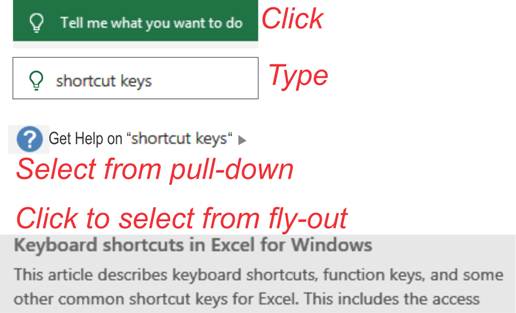
For a complete list of all keyboard shortcuts, go to the Help tab. Click on the Help? icon. When the Help dialog opens, type in shortcut keys and press Enter and select the topic Keyboard shortcuts for Excel in Windows.
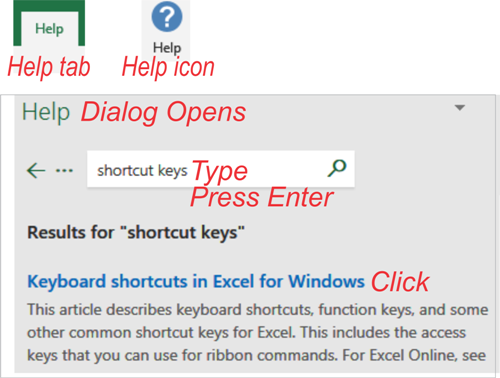
OR
Click in the Tell me what you want to do text box or keyboard Ctrl-Q. Type in shortcut keys. Select Get Help on "shortcut keys" from the pull-down. Then select the topic Keyboard shortcuts for Excel in Windows. from the fly-out.